HTML Language has been here since 1993. Since then it has been improved with many tags. Between the common and most used tags, few useful tags stays in the darkness. This post will show all of the hidden tags few people knows.
<details> and <summary>
<details> tag is used to show additional description which client can open or close. <summary> usually is used within details tag for heading.
#CODE

<details>

        <summary>Epcot Center</summary>

        <p>Epcot is a theme park at Walt Disney World Resort featuring exciting attractions, international pavilions, award-winning fireworks and seasonal special events.</p>

</details>


#OUTPUT

<progress>
This tag shows a pre-built progress bar in web page.
#CODE

<progress id="file" value="32" max="100"> 32% </progress>


#OUTPUT

<datalist>
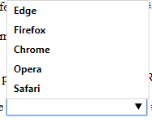
<datalist> tag shows a list of option using a drop-down like google search bar.
#CODE

<input list="browsers" name="browser" id="browser">

    <datalist id="browsers">

        <option value="Edge">

        <option value="Firefox">

        <option value="Chrome">

        <option value="Opera">

        <option value="Safari">

    </datalist>


#OUTPUT
<optgroup>
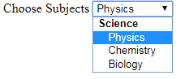
This tag makes a group of options inside a selection box with label. It is useful for categorizing list with a heading label
#CODE

<label>Choose Subjects</label>

    <select id="showtimes" name="showtimes">

        <optgroup label="Science">

            <option>Physics</option>

            <option>Chemistry</option>

        </optgroup>

    </select>


#OUTPUT
<center>
This tag is used for centering elements within layout.
#CODE
<center>This Is Now Aligned Center</center>


#OUTPUT

<cite>
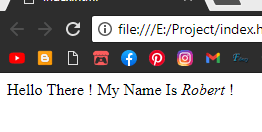
This tag makes the text within italic without css. It is useful for making quotes or a phrase from a book
#CODE

<p>Hello There ! My Name Is <cite>Robert</cite> !</p>


#OUTPUT
<acronym>
Acronym tag is used for defineing a word more in a popup box. It is used for giving a sentence an explanation
#CODE

<p>

<acronym title="Conseil Europeen Pour la Recherche Nucleaire">CERN</acronym> made the first website !

</p>


#OUTPUT

<address>
This tag is used for giving an address in a italic format. It’s just the browser knows that its an address nothing else 🙂
#CODE

<address>

        221B Baker Street, London

 </address>


#OUTPUT

<ins> and <del>
<ins> tag puts a line under the text or sentence and <del> puts a strike in the middle of a word or sentence like <strike>
#CODE

<p>

        <del>Can</del> <ins>May</ins> I Come In , Ma'am?

</p>


#OUTPUT

<wbr>
This tag is very useful to break certain part of a sentence or a long word when it is in responsive layout. It is like linebreak but it specifies which part can be broken.
#CODE

<p>

        pneumono

        <wbr>

        <wbr>microscopic

        <wbr>silico

        <wbr>volcanoconiosis

  </p>


#OUTPUT


<dialog>
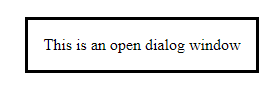
This tag shows a pre-built dialogbox or subwindow.
#CODE

<dialog open>This is an open dialog window</dialog>


#OUTPUT
<kbd>
The <kbd> tag is used to define keyboard input. The content inside is displayed in the browser’s default monospace font.
#CODE

<p>Press <kbd>Ctrl</kbd> + <kbd>C</kbd> to copy text (Windows).</p>


#OUTPUT

<mark>
This show a yellow background behind text just like yellow marker used on a line from a book.
#CODE

<p>Do not forget to buy <mark>milk</mark> today.</p>


#OUTPUT

<meter>
The <meter> tag defines a scalar measurement within a known range, or a fractional value. This is also known as a gauge.
#CODE

<label for="disk_d">Disk usage D:</label>

<meter id="disk_d" value="0.6">60%</meter>


#OUTPUT

<legend>
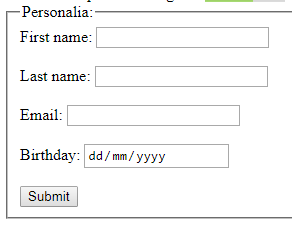
The <legend> tag defines a caption for the <fieldset> element.
#CODE

<form action="/action_page.php">

        <fieldset>

         <legend>Personalia:</legend>

         <label for="fname">First name:</label>

         <input type="text" id="fname" name="fname"><br><br>

         <label for="lname">Last name:</label>

         <input type="text" id="lname" name="lname"><br><br>

         <label for="email">Email:</label>

         <input type="email" id="email" name="email"><br><br>

         <label for="birthday">Birthday:</label>

         <input type="date" id="birthday" name="birthday"><br><br>

         <input type="submit" value="Submit">

        </fieldset>

</form>


#OUTPUT
<dfn>
This tag is for defining a word or statement. It basically makes the font type italic.
#CODE

<p>

        <dfn>HTML</dfn> is the standard markup language for creating web pages.

</p>


#OUTPUT

<bdo>
The <bdo> tag is used to override the current text direction
#CODE

<bdo dir="rtl">

        This text will go right-to-left.

</bdo>


#OUTPUT

<abbr>
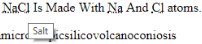
This tag is used like acronym but now for abbreviation.
#CODE

<abbr title="Salt">

NaCl

</abbr> Is Made With

<abbr title="Sodium">

Na

</abbr> And

<abbr title="Chlorine">

Cl

</abbr> atoms.


#OUTPUT
 Byronic